
Disclosure: WorkWise is reader-supported. When you buy through links on our site, we may earn an affiliate commission at no extra cost to you. Learn more.
The standard office mouse is one of the worst-designed pieces of equipment that office workers touch every day. It forces your forearm into a sustained pronated (palm-down) position that, over years, causes the classic outer-forearm ache and eventually wrist pain. The good news: three different mouse styles fix the problem in three different ways, and which one suits you depends on what kind of work you do.
The three categories
1. Ergonomic (sculpted) mouse
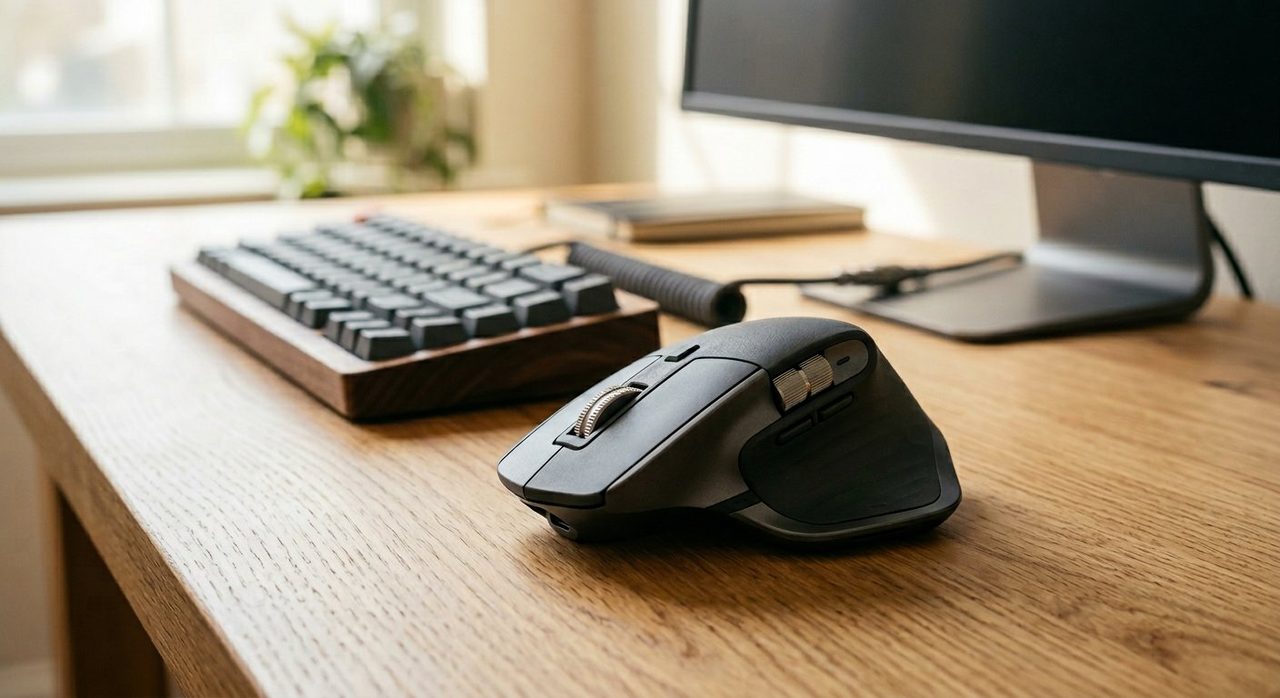
Looks like a regular mouse but with deeper contours, a more aggressive thumb rest, and often silent clicks. The Logitech MX Master 3S is the dominant example. Your hand position is essentially the same as a regular mouse but more supported.
2. Vertical mouse
Tilts the entire mouse 45–60° so your hand sits in a "handshake" position with the thumb on top. Eliminates forearm pronation almost entirely. The Logitech MX Vertical is the standard.
3. Trackball
The mouse doesn't move — you move the cursor by spinning a ball with your thumb or fingers. Your forearm stays completely still. Logitech MX Ergo (thumb-driven) and Kensington Expert (finger-driven) are the two main schools.
Quick decision guide
- You have no pain yet, but want comfort → ergonomic mouse (MX Master 3S).
- You have mild forearm or wrist ache → vertical mouse.
- You have severe wrist pain or RSI → trackball, plus a doctor visit.
- You do precision work (design, CAD, video) → ergonomic mouse with high DPI, or a pen tablet.
- You have very limited desk space → trackball (doesn't move).
- You travel a lot → ergonomic; vertical and trackball don't pack well.
Detailed comparison
Comfort over an 8-hour day
Trackball wins clearly — your forearm doesn't move at all. Vertical is a close second; the handshake position is more natural than any flat mouse. Ergonomic is the most comfortable of the "regular mouse" shapes but still requires forearm movement.
Precision and accuracy
Ergonomic mouse wins for fine precision (graphic design, CAD). Modern vertical mice are nearly as accurate. Trackballs are surprisingly precise for cursor movement but slower for pixel-level work.
Learning curve
Ergonomic: zero — feels like a slightly better regular mouse on day one. Vertical: 3–5 days. Trackball: 1–2 weeks for full proficiency.
Gaming compatibility
Only the ergonomic shapes work for gaming. Vertical and trackball are not designed for fast-twitch input.
Our top picks in each category
Logitech MX Master 3S
The most refined office mouse on the market. MagSpeed scroll wheel, silent clicks, multi-device pairing. The default upgrade for most knowledge workers.
Check price on AmazonLogitech MX Vertical
The chair-meets-mouse moment. If your forearm has ever ached after a long day, try this for two weeks.
Check price on AmazonLogitech MX Ergo
Adjustable tilt (0° or 20°), thumb-driven ball, programmable buttons. The trackball that most ergonomic-mouse users graduate to.
Check price on AmazonKensington Expert Mouse
A large ball you spin with your fingers, surrounded by four buttons and a scroll ring. Beloved by editors and engineers; symmetric for any hand.
Check price on AmazonThe "two mouse" strategy
An underrated approach: use two mice on the same desk, switching every hour. We know several developers and editors who keep an MX Master AND an MX Vertical, swapping mid-day. The variation prevents the repetitive strain of any single hand position.
Final word
If you've never tried anything other than a regular mouse, the Logitech MX Master 3S is the safe, instant upgrade. If you already have any forearm or wrist discomfort, jump straight to the MX Vertical for two weeks — most people who try it never go back. And if you've already tried both and still have pain, a trackball is the answer.
For the full ergonomic picture, pair your mouse choice with our keyboard guide and our chair guide.
Frequently asked questions
Is a vertical mouse really better for your wrist?
Yes, for most people with mild forearm or wrist pain. The 'handshake' position eliminates the forearm pronation that causes pain over long sessions. Studies show measurable reductions in muscle activity. Adaptation takes about 3–5 days.
How long does it take to adapt to a trackball?
About 1–2 weeks of regular use. The first three days feel clumsy, especially for clicking and dragging. By day 7 you'll match your old mouse speed; by week 2 you'll exceed it for many tasks.
Are trackballs good for graphic design?
Mixed. They're excellent for cursor-heavy work like CAD and video editing, but most designers prefer a pen tablet for actual drawing. A trackball + pen tablet is a common pro setup.
Do I need different mice for different hands?
Vertical mice are mostly handed (left or right). Standard ergonomic mice and most trackballs come in symmetric or handed versions — check before buying if you're left-handed.
Can a mouse really cause RSI?
Long-term, yes. Repetitive small movements with poor posture cause inflammation in the wrist and forearm tendons. The mouse type matters less than how you use it — but a poor-fitting mouse multiplies the risk.
Spotted a mistake or want to suggest a product we should test? Get in touch — we read every message.